
The 180-point Google Ads audit checklist.
First published 20 January 2024. Restored 1 November 2026; the numbers and the image are from then.
Over the last years we have reviewed the Google Ads accounts of over 69 finance, real estate and automotive businesses. Doing that, you build up a fairly sharp picture of what a working Google Ads account looks like, and we keep that picture in a checklist we run on every new customer to find a starting point.
It started as a “short” checklist. It snowballed into 180 points: every question we ask or think out loud while we review the account, the website, the competitors and the business goals.
Some of the points will sound extremely obvious. They are. The problem for you as the person running the business is that you have biases, and you can’t read the label from inside the jar.
Wayne Quek, head of Home Loan Whiz, after six months of working with us:
“Feisal is very knowledgeable and experienced when it comes to digital marketing. I felt he provided huge value by applying all of his experience to my Google Ads campaign, right from setting the account up properly to walking me step by step through campaign creation. I enjoy working with him and would recommend him to anyone seeking help in this area.”
Wayne Quek, home loan consultant in Singapore.
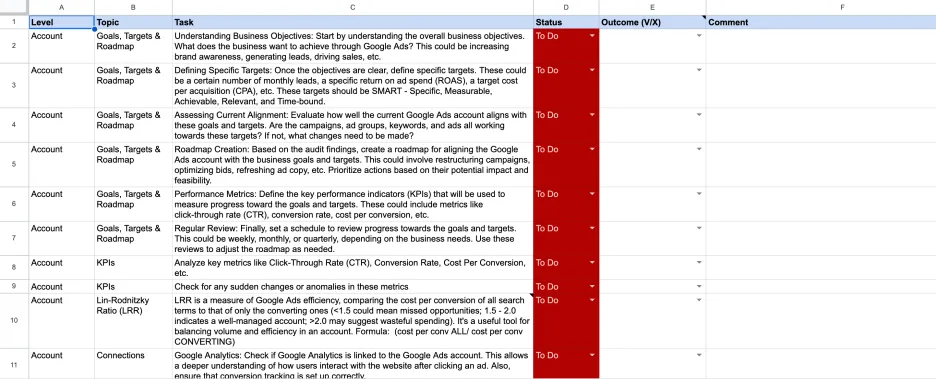
What does a 180-point audit cover?
The list is grouped by level: account, campaign, ad group, and a short “overall” block at the end. Below are the categories with a few items from each, so you get an impression of what we actually look at. This is not the full list.
What do we check at account level?
Goals, targets and roadmap. What does the business want from Google Ads: brand awareness, leads, sales? Are the targets concrete (monthly leads, ROAS, CPA)? Do the current campaigns, ad groups, keywords and ads actually work towards those targets?
KPIs and the Lin-Rodnitzky ratio. Cost per conversion across all campaigns divided by cost per conversion on the converting ones. Under 1.5 means missed opportunities, 1.5 to 2.0 is well managed, above 2.0 is wasteful. Also: sudden changes or anomalies in CTR, conversion rate and cost per conversion.
Connections. Google Analytics linked and conversion tracking set up correctly. Google Tag Manager properly connected. Call tracking software and the CRM linked to Google Ads.
Conversion tracking. Which conversion types are measured, and do they match the business objectives? Are the essential conversion actions set to primary, so the algorithms optimize on them, with the rest as secondary for reporting only? Does the conversion data in Google Ads match Google Analytics? Is the click-through window set right (typically 30 days, longer for B2B, automotive and high-ticket, shorter for lead magnets)?
Account settings. Auto-apply recommendations switched off. Timezone set to the client’s timezone. Account-level negative keywords in use, especially to contain PMax.
What do we check at campaign level?
Search campaign settings. Networks: Search Partners and Display Network typically off. Locations in advanced mode, with the rest of the area and the world excluded. Broad match switched off as the standard. IP exclusions for the client’s IP, our IP and the click fraud tool.
Display, Shopping, PMax and Discovery each get their own block. For Shopping: is the product feed optimized (titles, descriptions, attributes, lifestyle images), and are products labeled by margin? For PMax: is the brand excluded from the PMax campaign, is Final URL expansion on and if so why, and are there rejected text, image or video assets?
Structure. Campaigns logically organized by product or service category and target market. Ad groups tightly themed with relevant keywords. Separate campaigns for different networks (Search, Display, Video).
Bid strategy and budget. Which bid strategy is in use (Manual CPC, Target CPA, Maximize Conversions), and is the daily budget being fully utilized?
Audiences. Observation audiences set up. Irrelevant audiences identified.
What do we check at ad group level?
Keywords and quality score. Keywords with high clicks but no conversions identified. Irrelevant keywords identified and added to a negative list. Match types not mixed within an ad group.
Ads. Minimum 2 responsive search ads per ad group. Keywords mentioned in the headlines. Display path used.
Assets. Sitelinks used and relevant. Call extension relevant and set up. Price extensions used, minimum 4 if applicable.
What is in the “overall” block?
Competitive analysis. Auction Insights report reviewed. Google Ads Transparency Center checked.
Landing page. Landing pages relevant to the ad copy and keywords. Load time, mobile and CTAs checked with Lighthouse. Compared to competitor landing pages.
Why tracking comes first
Conversion tracking carries a quarter of the weight in our scoring, and it is the block everything else leans on. If the measurement is wrong, every item after it is measured against a broken number. A keyword that shows no conversions may be converting fine. A bid strategy that “works” may be steering toward a secondary action. So we check that the measurement is right before we look at the campaigns. What that first check keeps finding, we wrote up separately.
Where did the download form go?
November 2026. The original page ended with a form: fill it in and receive your free copy of the 180 points. That form is gone, and you no longer need it. The list is now a Google Sheet you can copy straight into your own Drive. Every item sits on its own row with its level, topic and task, plus columns for status and outcome, so you can work through it on your account.
Make your copy of the checklist →
The list gives you the questions. In the free audit we fill in the answers, on your account.